A recruiter wants your resume in Word: convert the PDF without wrecking it
By the getPDF team · Published 26 October 2026
The short answer
Drop the CV on PDF to Word and open the .docx: the name, contact line, section headings, bullets and the job lines with dates on the right come across as text, headings, lists and right-aligned paragraphs, in your font where the PDF names it. Then spend 5 minutes: check the contact line, every date and the page count, and set the font if yours was substituted. A designed CV with a sidebar and icons converts to its text in reading order; send the PDF alongside for the look.
Try it here, nothing is uploaded
Why they want Word, and what that means
A recruitment agency pastes CVs into its own template, removes your contact details before sending the CV to the client, adds a cover note, or feeds it to a system that parses .docx more reliably than PDF. In every case they will edit it. So the Word file does not need to look like your PDF; it needs to have all your text, in order, in a form they can select and move. That is what a flowing conversion gives, and it is why a pixel-perfect conversion with every line in a text box (text boxes) is the worst thing to send them.
What converts on a real CV
The test CV: a name in a large blue face, a grey contact line, 4 section titles in blue capitals with a rule under each, 3 jobs with the title on the left and the dates on the right, bullets under each job, and a skills list in 2 columns. Set in Helvetica, 2 pages. Converted on 26 October 2026 in 8 milliseconds: 1 heading, 21 paragraphs, 7 list items, 1 table (the skills), the dates right-aligned, Arial for the Helvetica. Word opened it as 2 pages, 1 table, 0 text boxes.
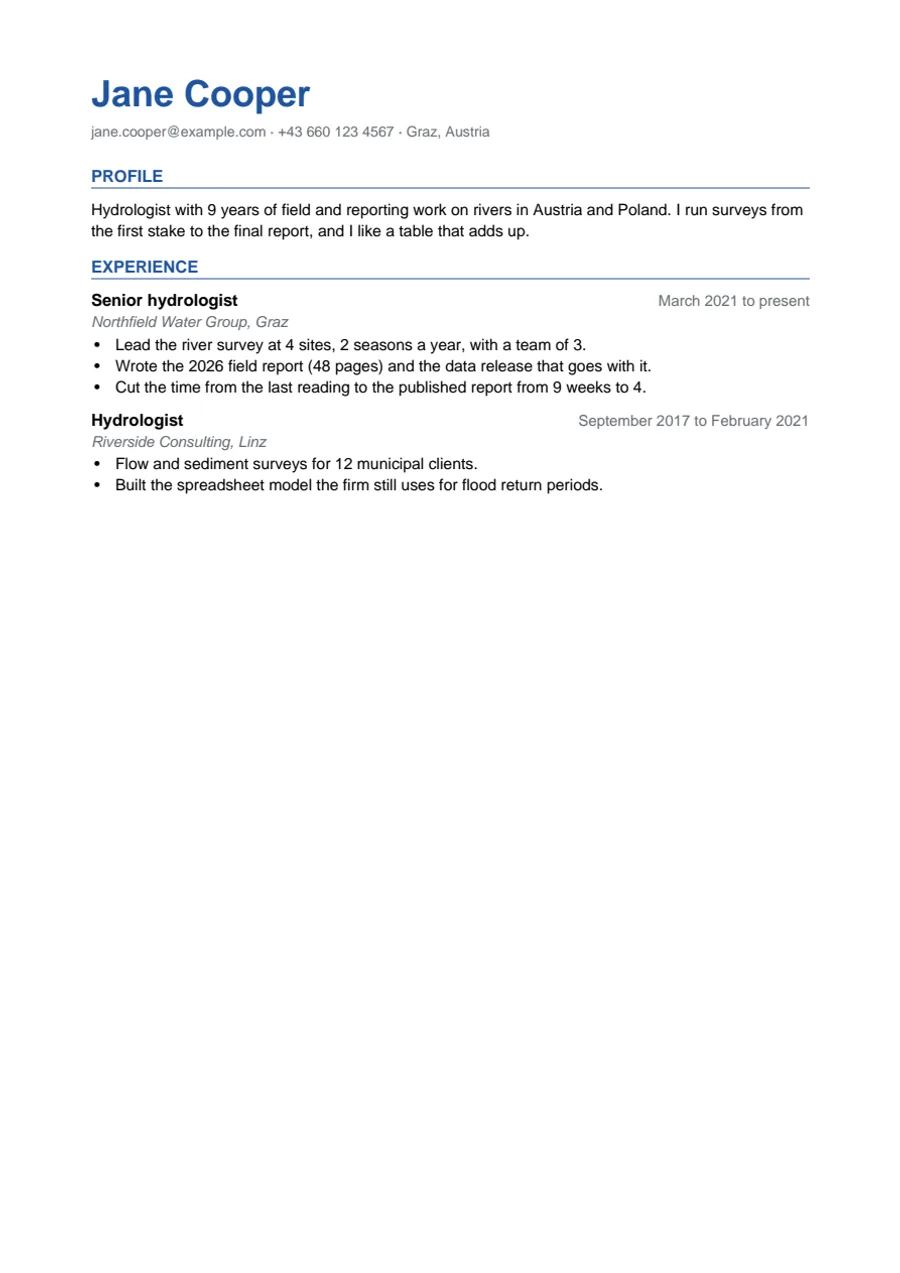
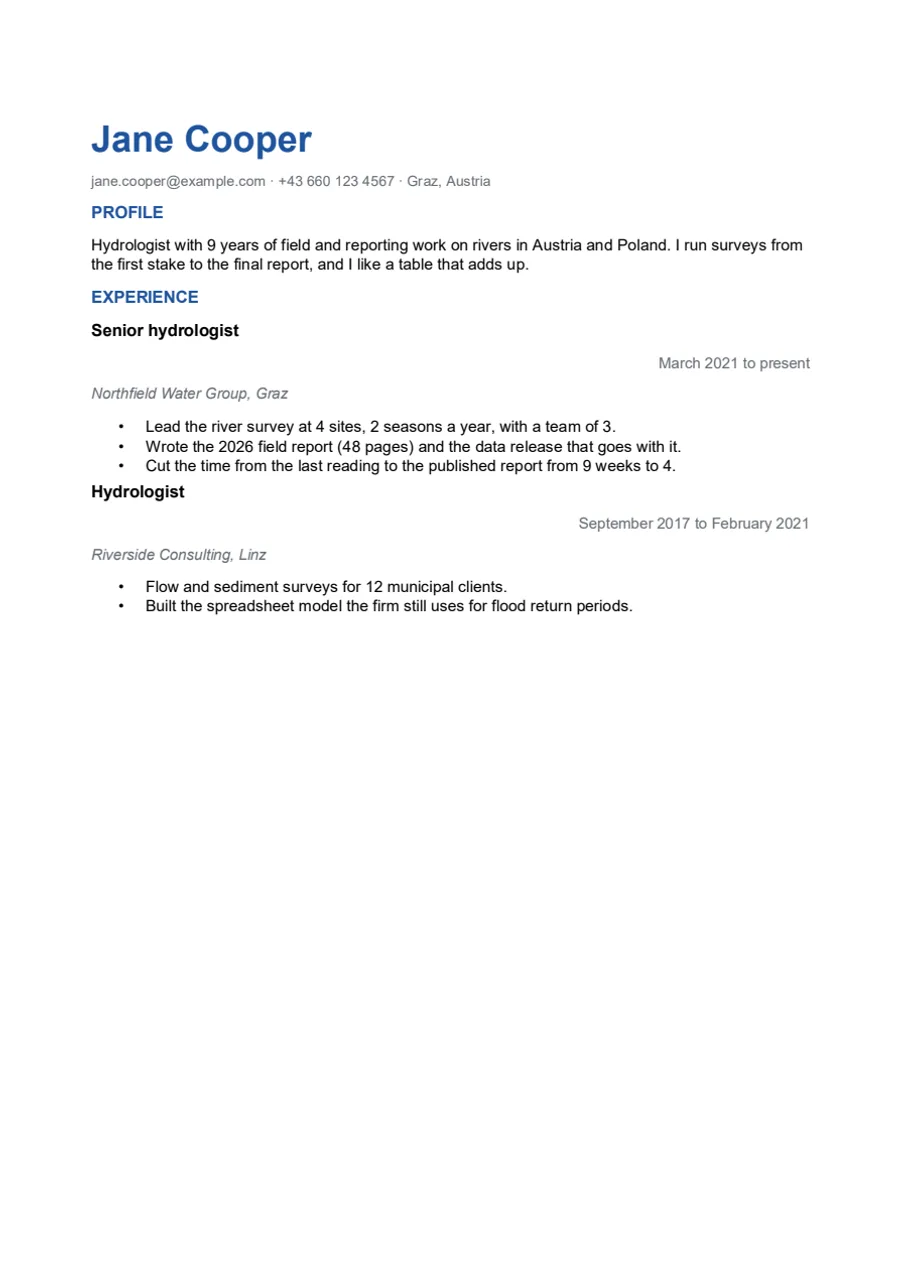
| On the CV | In the Word file | Check |
|---|---|---|
| Your name, large, in colour | A heading, the same colour | Spelling, nothing else |
| The contact line (email, phone, city, LinkedIn) | 1 paragraph; a link stays a link | The email and the phone number, digit by digit |
| Section titles (Experience, Education) | Headings; the rule under them is not kept | Add a bottom border if you want the rule (Home, Borders) |
| Job title left, dates right, on 1 line | The title as a paragraph and the dates as a right-aligned paragraph under it | Every date |
| Bullets | Word bullet list items | That none became a plain line |
| A 2-column skills list | A 2-column table without borders | That the pairs are the right pairs |
| A coloured sidebar, icons, a photo | The sidebar’s text in reading order; icons and background gone; the photo as a picture | Reading order |
| A font you chose | Its name, when the PDF carries it; Helvetica becomes Arial | Select all and look at the font box |
The 5-minute check before you send
- Print Layout, 100 %. Read the first screen: name, contact line, first job. Those are what a recruiter reads before anything.
- Ctrl+F for each year in your dates. 2019, 2021, 2024: each hit should be on the line it belongs to.
- Navigation pane (View, tick Navigation Pane): your section titles should be listed there, which means they are headings and a template will pick them up.
- Page count. A 2-page CV that is 3 pages in Word has a line wrapping somewhere; find it and shorten, or accept it. Lines wrap where Word wraps them, not where your PDF did.
- The font. If the font box says Calibri where you had something else, the PDF hid the name; set it once with Modify Normal (the font changed).
Then File, Save As, .docx, named Firstname-Lastname-CV.docx. Send it with the PDF if the look matters, and say “the PDF is the designed version, the Word file is for your template”.
A designed CV
A CV with a coloured sidebar, a skills bar chart, icons for phone and email and 2 columns of different widths is a layout, and a layout does not flow. The converter reads it in reading order: on most of these it takes the sidebar as a column and the main text as another, and writes them one after the other, both as plain text (PDF to Word with 2 columns explains the rule). The bar chart becomes nothing (it was lines, not text), the icons become nothing or a stray character, the background colour is gone.
That is fine for the recruiter, who will paste the text into a template anyway. It is not something to send as “my CV” on its own. For that, keep the PDF, and make the PDF itself the thing you send when the ad does not say Word.
The honest part
A CV is 1 or 2 pages designed to be scanned by eye in 10 seconds, and a flowing conversion keeps the content, not the design. The dates on the right survive as right-aligned text, but a CV that puts the dates in a narrow left column and the jobs on the right converts to 2 columns of text, and the pairing is by position, which can go wrong where a job has more lines than its date. Read it once. And if the recruiter’s system is the reason for the request, the plainest Word file wins: no table for the skills, no colour, headings in Word’s styles; 10 minutes of tidying after the conversion gets there.
Questions
Why does the recruiter want Word?
Agencies paste CVs into their own template, strip contact details before sending them to a client, or run them through a system that reads .docx better than PDF. A Word file they can edit is the point; it does not need to look like your PDF.
What converts cleanly?
Text, headings, bullet lists, bold and colour, the font name, and a line with the job on the left and the dates on the right. On the test CV all of that came through, with the dates right-aligned and the skills as a 2-column table.
What should I check before sending?
The name and contact line at the top, every date, the bullets, and the page count. Read it once in Word's Print Layout view at 100 %: 5 minutes.
My CV has a coloured sidebar and 2 columns. Will it convert?
The text will, in reading order: the sidebar first or the main column first by position. The coloured background, icons and the layout do not. For a designed CV, send the PDF and a plain Word version, and say which is which.
The tools for this job
Keep reading
- How to convert a PDF to Word, and what to expect when you open the resultHow to convert a PDF to Word in your browser in 3 steps, free, nothing uploaded, and what comes across: tested on an invoice, a report, a CV and a paper.
- The font changed after PDF to Word: why, and how to match it in a minuteAfter PDF to Word the font looks different for 1 of 3 reasons: the name was lost, the font is not installed, or it was mapped.
- Two-column PDFs into Word without the scrambleA 2-column newsletter or paper often converts with the columns woven line by line.
- Bullets and numbering after PDF to Word: what a converter can know, and what to expectA PDF stores a bullet as a glyph and a clause number as text, so a converter guesses.
- Resume to PDF: why employers ask, and how to get it rightSave your resume as a PDF free, on your device, so fonts and layout hold on any screen and hiring software reads it.
- PDF or Word: which file to send, and when it mattersSend a PDF when layout and finality matter, Word when others must edit.
- The converted Word file looks different: what changed, and the 5-minute fixesYour PDF to Word file looks different because page layout does not survive conversion.
- Edit your CV PDF when the source file is gone, and keep it readable for recruitersEdit your CV PDF free when the Word file is gone: change dates, job title and phone number as real text recruiters' software still reads.
- PDF to Word, Excel and text for free: what converts, what breaks, and how to pickConvert PDF to Word, Excel, plain text, Markdown or CSV free in your browser.